

What to Do When Android Phone Not Charging Properly? Panic strikes when you plug in your Android phone and nothing happens: no charging icon shows up. Even worse, it does show up but the battery percent just won’t rise. Your phone ties you to the world: calls, photos, payments, and games. Without any charge, you are in trouble.
Don’t immediately search for a substitute. Take a deep breath. Most problems originate from simple solutions, not complete failures. This guide will walk you through steps to perform. First, we hit simple checks, then on to tougher ones. You will either fix it or come out knowing the cause. What to Do When Android Phone Not Charging Properly?
Part 1: Basics First – Check Gear Outside the Phone
Look beyond the phone; faults hide in add-ons. Swap items one by one to spot the bad part.
Step 1: Eye and Swap the Cable
Cables fail most often. Daily tugs bend them, and twists snap inner wires.
- Close Look: Check ends for frays, bare wires, bent plugs. Cracked sheath? It’s toast.
- Key Swap: Looks good? Test anyway. Use a proven cable from elsewhere. Phone charges? Ditch the old one. Buy a solid new.
Step 2: Test the Wall Adapter (The Block)
Adapters do last longer than cables. Still, they quit.
- Swap It: Pair your good cable with another adapter.
- Other Location: No spare? Run cable to a PC USB port.
Note: The PC ports charge slow. Slow charge works? Phone and cable are fine. Old adapter failed. What to Do When Android Phone Not Charging Properly?
Step 3: Check the Outlet
- Outlet dead? Test it.
- Plug a lamp in there, for example. Lights up? Power flows.
- Try another spot, far, far away.
- All three done, no charge? Gear’s good, phone’s next.
Part 2: Top Fix – Grime in the Port
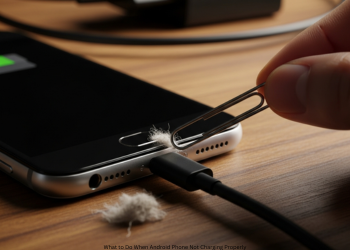
Ports trap pocket fuzz, dust, bits. Junk packs tight. Blocks cable contact. This tops the list for no-charge woes. What to Do When Android Phone Not Charging Properly?
Safe Clean Steps
Warning: Go soft. Pins inside bend easy. Skip metal picks—they spark and wreck.
Shut Phone Off: Key safety move, power down full.
Tools You Need:
- Top Pick: Air duster can. Blasts junk free, no touch.
- Backup: Soft stick like wood toothpick. Or SIM tool, super light touch.
- Peek Inside: Shine light. Lint buildup shocks.
Clean Process:
- Air Blasts: Short puffs clear loose material.
- Toothpick: Scrape walls gentle. Skip center pins. Scoop gunk out.
- Last Air: One more puff for stragglers.
- Test Charge: Boot up. Plug in. Clean fix often works magic.
Part 3: Software Hiccup?
Gear clean, phone spotless? Blame code or apps.
Step 1: Quick Reboot
Old fix rules: Clears junk processes. Hold power. Pick restart. Charge test after boot.
Step 2: Run in Safe Mode
Safe Mode skips user apps; spots bad downloads.
- Enter It: Hold power. Power menu pops. Long-press off icon. OK on safe prompt.
- Charge Test: Safe Mode displays label. Plug in.
Charges Fine? App did it. Eye recent installs battery apps, cleaners, guards. Delete till fixed.
No Luck? Not apps. Restart to quit Safe Mode. What to Do When Android Phone Not Charging Properly?
Part 4: Battery Check
Battery stats or code off? Common signs.
No Percent Rise: Though charging shows
Code mix-up on level. Recalibrate.
- Drain to Black: Use until shutdown.
- Rest Hour: Kills last juice.
- Full Charge Off: Good setup to 100%. Extra hour plugged.
- Boot Up: Often clears gauge true.
- Super Slow Charge: Good gear unused.
Battery fades, holds less. Check health.
- Phone Menu: Settings, Battery. Health view displays max hold.
- Apps Help: AccuBattery tracks cycles deep.
Part 5: Pro Help Time
Every step tried? Still no go? Hardware broke. Seek repair pros.
- Damaged Charging Port: It may have bent pins or heavy wear.
- Dead Battery: The battery may be worn out and ready for replacement.
- Motherboard Failure: Sometimes, the charging chip on the motherboard stops functioning. What to Do When Android Phone Not Charging Properly?
- Liquid Damage: Small droplets of water can rust the fine parts of the port.
Check the white sticker in the SIM tray. Red or pink shows liquid contact. Your safest move is a trusted repair shop or maker support. What to Do When Android Phone Not Charging Properly?
Conclusion
A phone skipping charges frustrates anyone. Yet, it seldom kills the device. Stay methodical: Test your cable and plug, clean the port with care, run the checks on Android. You can fix most problems yourself at home, so when you get stuck, you will know you tried it all before the pros stepped in. What to Do When Android Phone Not Charging Properly?
FAQs
Q1: What should I do first if my phone is not charging?
Test the cable first. It fails most often. Grab a known good one. No luck? Swap the wall plug and outlet.
Q2: My phone charges only when I tilt the cable. Why?
Poor contact inside. Possibly bent wires of cable at the end, or worn-out phone port. Try a new strong cable. Still bad? Fix the port.
Q3: Can I safely clean the port? How?
Yes, if careful. Power off fully. Blow off with canned air. No can? Gently dig out lint with plastic toothpick. Avoid metal such as clips as they scratch badly. What to Do When Android Phone Not Charging Properly?
Q4: Charging icon shows but battery stays flat. What’s up?
Mix-up on battery read software. Simple restart. No fix? Drain dead then charge off to full.
Q5: New app messing with charge?
Possible but rare. Boot to Safe Mode. What to Do When Android Phone Not Charging Properly?
Q6: Normal charge there? Blame an app. Drop recent ones, like cleaners, till it works. Tried all steps, still dead charge. Next?
Accessories good, port clean, Safe Mode tested-it’s hardware. Bad port, shot battery, or board fault. Go to repair pros or maker help. What to Do When Android Phone Not Charging Properly?
1 thought on “What to Do When Android Phone Not Charging Properly?”