
How to Increase Mobile Hotspot Speed Without App? Are you frustrated with your phone’s hotspot speeds when sharing with a laptop or tablet? Don’t blame your phone or carrier just yet. With a few simple tweaks-no apps involved-you can increase your speed and stability significantly. We start with the top fixes, down to smaller ones.
Part 1: The Key Setting to Flip First
Pick just one? Make it this.
Use the 5 GHz Wi-Fi Band for Your Hotspot
The phones tend to operate on the default setting of 2.4 GHz. It’s old, busy, and sluggish. For speed and fewer glitches, switch to 5 GHz.
- Why it helps: 2.4 GHz is like a jammed back road. 5 GHz is like a wide expressway with top-end pace.
- Main drawback: 5 GHz reaches less and doesn’t skip walls very well. Use it when your laptop resides close, within the same room.
Steps to switch:
On Android – Samsung, Pixel, etc.:
- Open Settings.
- Select Network & internet (or Connections).
- Hit Hotspot & tethering > Wi-Fi hotspot.
- Tap AP Band or Band.
- Move from “2.4 GHz Band” to “5.0 GHz Band Preferred” or “5.0 GHz Band.”
On iPhone (iOS):
- Go to Settings > Personal Hotspot.
- Switch “Maximize Compatibility” off.
- Weirdly, it means that on is sticking to slow 2.4 GHz for old gear while off unlocks quick 5 GHz.
Part 2: Spot and Setup Make a Big Difference
Where you place your phone can affect cell signal and Wi-Fi reach. How to Increase Mobile Hotspot Speed Without App?
Boost Cell Signal
Hotspot caps out at whatever cell speed your phone has. Garbage in, garbage out.
- Hunt signal: Put phone by a window or up a floor. Aim for full bars. In other words, 4G/LTE or 5G. One bar drags everything down. How to Increase Mobile Hotspot Speed Without App?
- Skip blocks: Thick walls, metal, or basements kill the signals.
Keep Wi-Fi Path Clear
- Phone-to-laptop Wi-Fi requires open space.
- Stay close: Keep devices nearby.
- Lift the phone: Place it on a table; avoid floor and bag.
- Dodge hurdles: Walls, chairs, bodies weaken signal. Aim for direct view.
Part 3: Manage Links and Phone Load
The phone handles cell intake and Wi-Fi out. Ease its work.
Drop Extra Devices
All devices hooked into it split bandwidth. Want a tablet, a speaker, and laptop? They will halve speeds. Unplug what you don’t need now. How to Increase Mobile Hotspot Speed Without App?
Cut Phone Background Tasks
- Apps updating or syncing steal power from hotspot.
- Close unnecessary apps.
- Stop big downloads or updates.
Review Data Plan
Plans labeled “unlimited” often cap high-speed data at, say 50GB. Hit it, and carrier slows you till month end. The hotspot lags on purpose. Check your app or site for caps. How to Increase Mobile Hotspot Speed Without App?
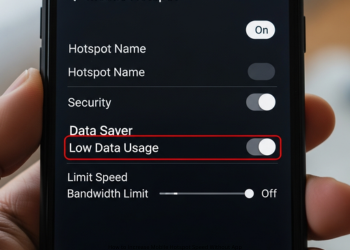
Disable Data Saver or Low Data Mode
These cut data use but slow speeds.
- Android: Settings > Network & internet > Data Saver. Disable
- iPhone: Go to Settings > Cellular > Cellular Data Options > Low Data Mode. Turn it off.
Part 4: Top Speed Hack: USB Tethering
For max speed and stable connection to one device, say a laptop, use USB tether and forget about Wi-Fi. How to Increase Mobile Hotspot Speed Without App?
It works by: Plug phone into laptop via cable. Internet flows directly into wire.
Why better:
- Quicker: Wire cuts delay, beats wireless.
- No glitches: It disregards noise from other’s Wi-Fi.
- Phone charges: Laptop powers it up, no battery drain.
To start USB tether:
- Plug USB cable from phone to laptop.
- Settings > Network & internet > Hotspot & tethering.
- Turn on USB tethering. Laptop detects it as a new network.
Conclusion
Supercharge your mobile hotspot – no apps required and no need for technical ability. The best fix is simple: switch the Wi-Fi band from 2.4 GHz to faster 5 GHz. If you keep your device near, this switch will significantly increase your speeds. Strong connections are everything. Hotspot speed ties to your cell signal quality. Place your phone near a window, far from blocks, for top reception. Keep a clear path to the connected device for peak Wi-Fi power. How to Increase Mobile Hotspot Speed Without App?
Cut connected devices. Stop phone background data drain. Watch your plan’s data caps. For one laptop, USB tethering wins: direct link, no glitches. These steps will turn slow hotspots into fast, steady internet. How to Increase Mobile Hotspot Speed Without App?
FAQs
Q1: What is the single best way to make my hotspot faster?
Use the 5GHz band instead of the 2.4GHz. The setting is found under AP Band in Android hotspot settings and turning OFF Maximize Compatibility in Personal Hotspot for iPhone users. You get faster speeds on a less crowded band. How to Increase Mobile Hotspot Speed Without App?
Q2: Why is the 5 GHz band faster? Are there any downsides?
5 GHz acts like a wide new road for data, outpacing old 2.4 GHz. The downside with this is shorter range and weak through walls or floors. Use it when phone and device, say a laptop, share the same room.
Q3: I have switched my hotspot to 5 GHz and it is still running slow. What is the next most probable cause?
Poor cell signal. Hotspot speeds cap based on the link from your phone to the tower. Poor number of bars in 4G, LTE, or 5G means slower speeds. Move phone to a window or to a new spot first for better bars.
Q4: What is USB tethering and how is it better than a Wi-Fi hotspot?
USB tethering simply connects your phone to your computer with a cable and shares the internet. It beats Wi-Fi hotspots three ways.
Faster speeds and low delay from a wired link.
No Wi-Fi clutter from neighbors.
It charges over the phone, not drains. How to Increase Mobile Hotspot Speed Without App?
Q5: I have an “unlimited” data plan, but after a few days my hotspot becomes extremely slow. Why?
Most “unlimited” plans cap high-speed hotspot data, such as 50 GB. Hit that amount, and the carrier slows it to a crawl until the next bill. Check your plan’s fine print with your carrier; this is their rule, not a glitch. Q6: Does the battery level of my phone affect the speed of my hotspot? Yes, low battery turns ‘Power save mode’ on. It throttles CPU and network to save juice, hotspot lags as a result. Charge your phone for best speeds. Alternatively, you can use USB tethering or wall plug while running hotspot. How to Increase Mobile Hotspot Speed Without App?
1 thought on “How to Increase Mobile Hotspot Speed Without App?”