

How to Fix SIM Card Not Detected on Android? A “SIM card not detected” error just feels awful. It blocks calls, texts, and data. The fix is often simple to do yourself. This full guide shows the steps for fixing it on Android phones.
How to Fix “SIM Card Not Detected” on Android: Ultimate Guide
Your phone cannot read the data from the SIM. These can be due to glitches, dirty or loose cards, software bugs, and sometimes rare hardware faults. Start with the easy fixes, then advance. How to Fix SIM Card Not Detected on Android?
Part 1: Quick Easy Fixes (Do These First)
Most users solve it here.
Restart your phone
Reboots work for a reason. It refreshes the OS. The phone re-scans hardware like the SIM slot. This clears glitches fast. How to Fix SIM Card Not Detected on Android?
Turn Airplane Mode On and Off
- It renews your cell connection quickly.
- Quick Settings: Swipe down from top of screen.
- Tap Airplane Mode to turn it on.
- Wait 30 seconds for the connections to drop.
- Tap again to disable. The phone is now scanning for network and SIM.
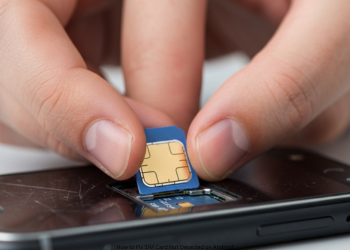
Remove and Reinsert SIM Card
Loose, dirty, or bad seating causes most problems.
Power Off Phone: Safer for internal parts.
Eject Tray: Use eject tool or paper clip in side hole. The tray pops out.
Check and Clean:
- Take out SIM from tray.
- Look at the gold contacts for dirt or marks.
- Wipe them soft with dry microfiber cloth; skip water or alcohol.
- Put Back Right: Fit SIM to tray shape. Push tray in till it clicks.
- Power on. Check whether SIM shows up.
Part 2: Important Tests to Determine the Cause
Is it phone or SIM? Find out. Do this next.
Try SIM in Another Phone
- Best test for the SIM.
- Use a friend’s unlocked phone.
- SIM works there? Phone is the problem. Go to Part 3.
- SIM fails there? SIM is bad or off. Call carrier – AT&T or Verizon – for a new one.
Try different SIMs in your phone
- Reverse check.
- Use a working SIM from elsewhere.
- It can be read by the phone? The original SIM was no good.
- Phone skips it? Hardware problem in phone, such as SIM reader.
Part 3: Software Fixes for Phone Issues
Diagnostics show phone fault? Try these.
Reset Network Settings
Resets the networks to default settings. Repairs stubborn links.
Warning: Loses Wi-Fi passwords, Bluetooth pairs. No data loss.
- Settings > System > Reset options. (Search “Reset” if needed.)
- Select Reset Wi-Fi, mobile & Bluetooth.
- Tap confirm. The phone restarts.
Manual Network Selection
Phone misses auto-connect sometimes.
- Settings → Network & internet → SIMs.
- Turn off “Automatically select network.”
- It scans networks. Wait a bit.
- Tap your carrier from the list, for example, T-Mobile.
Clear Cache for SIM Toolkit App
Rare fix, but try it.
- Settings > Apps > See all apps.
- Tap the menu dots. Show system apps.
- Find and tap SIM Toolkit.
- Storage & cache > Clear cache.
Part 4: Final Options
Nothing worked? Last tries.
Update Software
- Caused by OS Bug. Update fixes some.
- Settings > System > System update. Install any.
Factory Reset
- Nuclear option. Resets to new; wipes all.
- Backup photos, contacts, apps first. Those are all gone otherwise
- Settings > System > Reset options.
Erase all data (factory reset). Confirm
Last Step: Get Pro Help
- Tried all, reset failed, or the phone skips all SIMs? Hardware broke. SIM reader is probably dead.
- Call maker or go to repair shop to check and fix.
Conclusion
The “SIM card not detected” error is common. It’s easy to fix. Rarely does it mean your phone is broken. You solve it with a step-by-step check. Most problems are caused by dirty or loose SIM cards. You fix those in seconds. The rest get handled with a restart or network reset. How to Fix SIM Card Not Detected on Android?
The key test is simple: try your SIM in another phone, put a working SIM in yours. This shows whether the SIM or phone hardware is bad. Software fixes fail after factory reset? The phone’s SIM reader is faulty. Follow these steps. Fix it yourself or know what to repair. How to Fix SIM Card Not Detected on Android?
FAQs
Q1: My phone isn’t detecting my SIM, but it was working fine an hour ago. What’s the quickest thing to try?
Try these two fast steps first.
Restart your phone. It fixes most software glitches.
Enable Airplane Mode for 30 seconds. Disable it. Your phone rescans for the SIM and network. How to Fix SIM Card Not Detected on Android?
Q2: How do I determine if my SIM card is dead or if my phone is broken?
Run this two-part test:
Test 1: Put your SIM into another working phone. If it works, blame your phone.
Test 2: Insert a good SIM from another phone. No detection? Your phone’s SIM reader is broken.
Q3: I just dropped my phone and now it says “No SIM.” What likely happened?
That drop jarred the SIM tray loose; it lost contact with the pins. Eject the tray, check the card, seat it tight, and push it back in. How to Fix SIM Card Not Detected on Android?
Q4: What does “Reset Network Settings” do?
Will it delete my photos or apps?
It skips your photos, contacts, or apps; This reset clears only network info.
Wi-Fi networks and passwords.
Bluetooth pairings.
Cell settings.
Re-enter Wi-Fi passwords. Re-pair Bluetooth afterwards. How to Fix SIM Card Not Detected on Android?
Q5: After I restart my phone, it detects the SIM card, but after some time, the error comes back. What does that mean?
It signals a software bug or loose part. A network reset or factory settings may help. Or the SIM or tray is damaged. It loses contact now and then. Look for harm on the SIM. How to Fix SIM Card Not Detected on Android?
Q6: I performed a factory reset, and it still says, “No SIM card.” What now?
Factory reset wipes and reloads software. Still no SIM? Hardware failed. The SIM reader is bad. Take it to a repair shop or call the maker. How to Fix SIM Card Not Detected on Android?
1 thought on “How to Fix SIM Card Not Detected on Android?”